SEO Beginners: How to Rank Higher, Get Organic Traffic & Build Free Backlinks in 2026
Every successful website starts with one thing: understanding SEO beginners need simple, practical strategies instead of confusing technical jargon. Whether you’re launching a blog, business website, or online store, learning how search engines work can help you attract consistent organic traffic without spending money on ads.
Every day, millions of people use Google to find answers, products, and services, yet only a handful of websites secure the top positions. The difference isn’t luck—it’s a well-planned SEO strategy built on valuable content, excellent user experience, and proper optimization.
Many people assume SEO is difficult, but modern search engine optimization is much simpler than it seems. By focusing on quality content, keyword research, technical improvements, and user intent, anyone can build a website that ranks and grows over time.
This complete guide will walk you through every essential SEO concept, from understanding Google’s ranking process to creating optimized content and increasing organic traffic in 2026 and beyond.
What Is SEO and Why Does It Matter?
SEO (Search Engine Optimization) is the process of improving a website so that search engines can understand, index, and rank its pages for relevant search queries.
In simple words, SEO helps your content appear when someone searches on Google. For example, imagine two websites publishing an article about “How to Start Blogging.” Both articles contain useful information, but one website has better optimization, stronger internal links, faster loading speed, and a better user experience. Google is far more likely to rank that page higher because it provides a better overall experience.
SEO is not about manipulating search engines. It is about helping search engines understand your content while delivering real value to users.
Why SEO Matters More Than Ever
SEO provides long-term benefits that paid advertising cannot.
It helps you:
- Generate consistent organic traffic
- Build trust and authority
- Reduce customer acquisition costs
- Increase conversions
- Grow your brand naturally
- Create sustainable long-term results
Unlike paid campaigns that stop producing visitors when your budget ends, a well-optimized article can continue attracting readers for months or even years.
How Search Engines Actually Work
Many SEO beginners focus only on keywords without understanding how search engines operate.
Google follows a simple process.
Step 1: Crawling
Google uses automated bots called crawlers to discover new pages across the internet. They move from one page to another using links and collect information about websites. If your website has clear navigation and proper internal linking, crawlers can easily discover your content.
Step 2: Indexing
After discovering a page, Google analyzes its content and stores it in its massive database called the index. If a page cannot be indexed due to technical problems, it will never appear in search results. This is why technical SEO is an essential SEO foundation for every website.
Step 3: Ranking
When someone searches for a keyword, Google’s algorithm evaluates thousands of pages and selects the most helpful results.
Ranking depends on multiple factors, including:
- Content quality
- Search intent
- Website authority
- Internal linking
- User experience
- Mobile friendliness
- Loading speed
- Relevance
Google’s goal is simple:
Deliver the most useful answer as quickly as possible.
Types of SEO Explained
Many SEO beginners think SEO is only about adding keywords. In reality, successful optimization consists of three major components.
1. On-Page SEO
On-page SEO focuses on everything you can optimize directly on your website.
Examples include:
- Titles
- Headings
- Meta descriptions
- Images
- Internal links
- URL structure
- Content quality
Every article you publish should follow a clear on-page optimization strategy.
2. Technical SEO
Technical SEO improves your website’s infrastructure.
It includes:
- Website speed
- Mobile responsiveness
- HTTPS security
- XML sitemap
- Crawlability
- Indexing
- Structured data
Even excellent content may struggle to rank if technical issues prevent Google from properly understanding the site.
3. Off-Page SEO
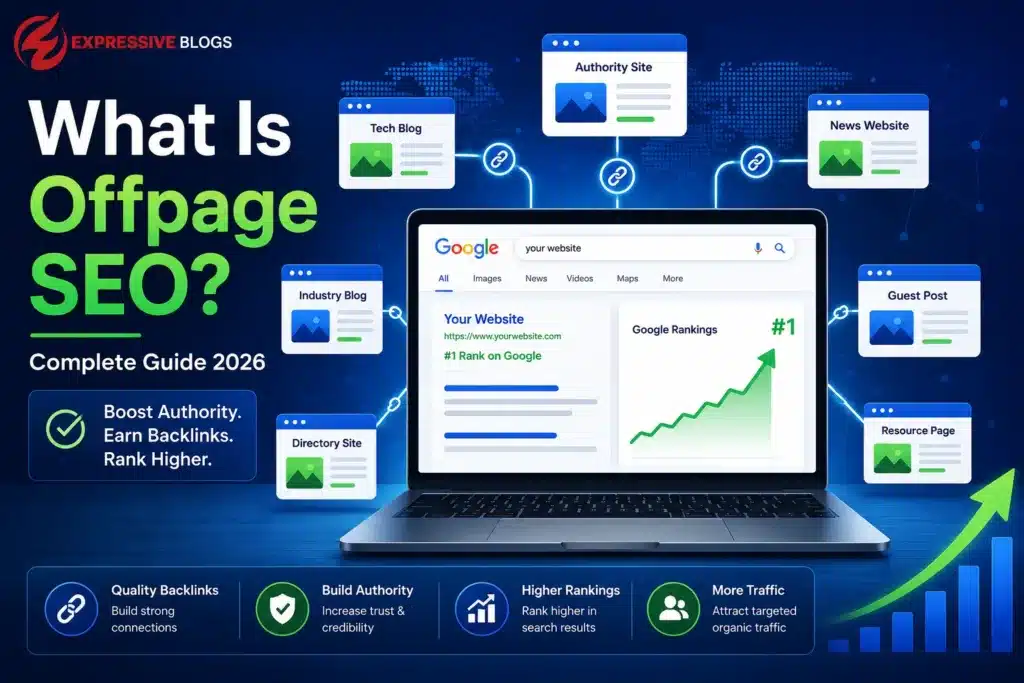
Off-page SEO refers to actions outside your website that improve authority.
Examples include:
- Quality backlinks
- Brand mentions
- Digital PR
- Guest posting
- Social sharing
Think of backlinks as recommendations. When trusted websites link to your content, search engines gain confidence in your expertise.
Essential SEO Basics Every Beginner Should Learn
Many beginners think SEO starts with premium tools, complex audits, or expensive software. In reality, the strongest SEO strategies are built on a few simple fundamentals. If you understand how search engines interpret content and what users are actually looking for, you’re already ahead of many new website owners.
Understand Search Intent Before Choosing a Keyword
Every search query reflects a specific goal. People don’t just type words into Google—they search because they need an answer, a solution, or a product.
For example, someone searching “best laptops under $1000” is looking for product recommendations and comparisons. On the other hand, a user searching “how to clean a laptop screen” wants a clear step-by-step guide, not a sales page.
When your content matches the user’s intent, visitors stay longer, engage with your website, and are far more likely to trust your information. These positive user signals can contribute to stronger search performance over time.
Always Write for Humans First
Search engines have become increasingly effective at recognizing content that genuinely helps readers. Instead of repeating the same keyword multiple times, focus on creating articles that answer real questions, provide practical examples, and solve problems.
Use simple language, organize your content with clear headings, and break long paragraphs into readable sections. The easier your content is to understand, the more likely readers are to continue scrolling, share your article, and return for more.
Great SEO isn’t about writing for algorithms—it’s about creating content that people enjoy reading. When users find value in your article, search engines are much more likely to reward it with better visibility.
Build Topical Authority Instead of Publishing Random Articles
Creating a single SEO article is a good start, but it won’t establish your website as a trusted resource. Search engines prefer websites that cover a topic in depth rather than touch on it once and move on.
Think of your blog as a complete learning hub. If someone lands on your SEO guide, they should also be able to explore related topics without leaving your website. This creates a better user experience and signals that your content is comprehensive and authoritative.
To strengthen your topical authority, create supporting articles around your main subject, such as:
- Keyword Research: Learn how to find search terms that attract the right audience.
- On-Page SEO: Optimize titles, headings, meta descriptions, and content structure.
- Technical SEO: Improve website speed, indexing, mobile usability, and overall performance.
- Link Building: Earn high-quality backlinks that increase credibility and rankings.
- Local SEO: Help businesses appear in location-based searches and Google Maps results.
- Image Optimization: Use compressed images, descriptive file names, and alt text for better visibility.
- Content Strategy: Plan interconnected content that answers user questions at every stage of their journey.
When these articles are internally linked and regularly updated, they create a powerful content ecosystem that demonstrates expertise. Over time, this approach not only improves rankings for individual pages but also increases the overall authority and trustworthiness of your website in the eyes of both users and search engines.
Optimize Images for Better SEO and User Experience
Images do much more than make a page visually appealing—they also play an important role in SEO, accessibility, and website performance. Properly optimized images can improve page speed, enhance the user experience, and even help your content appear in Google Image Search.
Before uploading any image, follow these essential optimization practices:
- Use Descriptive File Names: Replace generic names like
IMG1234.jpgwith meaningful filenames such asseo-basics-checklist.jpg. - Write Clear Alt Text: Describe the image naturally to improve accessibility for screen readers and provide additional context to search engines.
- Compress Images: Reduce file size without sacrificing quality to ensure faster loading times and better Core Web Vitals performance.
- Choose Proper Dimensions: Upload images in the correct size instead of relying on CSS to resize large files, which can slow down your website.
Optimizing every image may seem like a small task, but it has a significant impact on overall SEO. Faster pages keep visitors engaged, improve mobile performance, and create a smoother browsing experience—all of which contribute to stronger search rankings and higher user satisfaction.
Use Internal Links to Strengthen Your SEO Strategy
Internal linking is one of the simplest yet most effective SEO techniques that many beginners overlook. By connecting related pages on your website, you make it easier for readers to explore additional resources while helping search engines understand the structure and hierarchy of your content.
For example, if you’re discussing content creation or on-page optimization, you can naturally guide readers to a Free AI Writing Tools page where they can generate blog outlines, compelling titles, meta descriptions, keyword ideas, and content frameworks more efficiently. This provides immediate value without interrupting the reading experience.
A well-planned internal linking strategy also encourages visitors to spend more time on your website, reduces bounce rates, and distributes page authority across important articles. Instead of treating every blog post as a standalone page, connect related content to create a comprehensive knowledge hub that benefits both users and search engines.
Quick SEO Checklist for Beginners
- Publish original content
- Understand search intent
- Use descriptive headings
- Optimize images
- Add internal links
- Improve page speed
- Make your website mobile friendly
- Update old articles regularly
- Build quality backlinks
- Measure performance using analytics
This foundation separates successful websites from those that rely on shortcuts or outdated tactics. Once these basics become part of your workflow, every new article has a stronger chance of earning long-term organic visibility and building authority within your niche.
Keyword Research for Beginners: The Foundation of Every Successful SEO Strategy
If content is the engine of SEO, keyword research is the fuel that keeps it running. One of the biggest mistakes SEO beginners make is writing an article first and looking for keywords later. Professional SEO works in the opposite direction. First, understand what people are searching for, then create the best possible answer. Instead of targeting random phrases, focus on keywords that have clear search intent and match your audience’s needs.
Understanding Search Intent
Google ranks pages that satisfy user intent. There are four main types of search intent.
| Search Intent | Example |
| Informational | What is SEO? |
| Navigational | Google Search Console |
| Commercial | Best SEO tools |
| Transactional | Buy SEO course |
Someone searching SEO Basics for Beginners wants education, practical steps, examples, and checklists—not a sales page. That is why this guide focuses on helping users instead of pushing products.
How to Find the Right Keywords for Your Content
Finding the right keywords is one of the most important steps in creating content that ranks on search engines and attracts the right audience. Many beginners make the mistake of targeting a single keyword and creating multiple short articles around related topics. A better approach is to build comprehensive content that answers all the questions a user may have about a subject.
Start with one broad topic that your audience is interested in.
Example Topic: Freelancing for Beginners
Once you have your main topic, expand it into related questions and subtopics that people are actively searching for online.
- How to start freelancing as a beginner?
- Best freelancing platforms for new freelancers
- How to find your first freelance client
- Essential freelancing skills to learn
- How to create a freelance portfolio
- How to receive freelance payments
Instead of publishing several thin articles that provide limited value, create one in-depth resource that covers every important aspect of the topic. Comprehensive content helps improve user experience, increases time spent on your website, and strengthens your topical authority in the eyes of search engines.
Understanding Primary and Secondary Keywords
A well-optimized article should focus on one primary keyword while naturally incorporating related terms throughout the content.
Primary Keyword
Freelancing for Beginners
Secondary Keywords
- Freelancing Guide
- Beginner Freelancing Tips
- Start Freelancing Online
- Freelance Career
- Freelancing Skills
Semantic Keywords
Search engines have become smarter and now understand context rather than relying solely on exact-match keywords. This is why semantic keywords play a crucial role in modern SEO.
Examples include:
- Online Earning
- Remote Work
- Freelance Platforms
- Client Acquisition
- Portfolio Building
- Fiverr
- Upwork
- Digital Skills
- Project Management
- Payment Methods
Using these related terms naturally throughout your content helps search engines understand the topic more effectively while making the article more valuable for readers.
Focus on Search Intent
The goal of keyword research is not simply to find words with search volume. It is to understand what users are actually looking for and create content that satisfies their intent. When your content answers real questions and provides practical solutions, it has a much better chance of ranking higher and earning the trust of your audience.
By combining a strong primary keyword, relevant secondary keywords, and naturally related semantic terms, you can create content that is both SEO-friendly and highly engaging for users.
What Is Semantic SEO?
Modern search engines no longer rely only on exact-match keywords. Instead, they analyze the overall meaning, context, and relationships between concepts within a piece of content. This approach is known as Semantic SEO.
For example, an article targeting “SEO Beginners” should naturally discuss related topics such as keyword research, search intent, backlinks, technical SEO, internal linking, content optimization, and user experience. By covering related concepts, search engines gain a deeper understanding of your content and can rank it for a wider range of relevant queries.
Instead of repeating the same keyword multiple times, focus on building topical depth and answering every important question your audience may have. This creates stronger relevance and a better user experience.
Entity SEO Explained
Entity SEO focuses on helping search engines understand important people, places, brands, organizations, and concepts mentioned within your content.
An entity is anything that can be clearly identified and understood independently.
Examples of SEO-related entities include:
- Search Console
- Search Engine Optimization
- WordPress
- Backlinks
- Content Marketing
- Google Analytics
When you naturally include relevant entities throughout your content, search engines gain a clearer understanding of your topic and expertise.
Entity SEO strengthens topical authority because it demonstrates comprehensive coverage of a subject rather than focusing on a single keyword. As search algorithms become more advanced, entity optimization continues to play an increasingly important role in modern SEO.
On-Page SEO Checklist
Many websites publish great content but forget basic optimization. Before publishing every article, review this checklist.
Optimize Your Title
A strong title should clearly explain the topic, include the primary keyword naturally, and encourage users to click.
Instead of: Guide to Freelancing
Write: How to Start Freelancing in 2026: A Complete Beginner’s Guide to Finding Clients and Earning Online
This title immediately tells readers what they will learn while naturally incorporating the target keyword.
Write a Compelling Introduction
The introduction is often the deciding factor in whether a visitor stays on your page or leaves.
A strong introduction should answer three important questions:
- What is this article about?
- Why should the reader keep reading?
- What value will they gain?
When readers quickly understand the benefits of your content, engagement increases and bounce rates decrease.
Use Proper Heading Structure
A clear heading structure improves readability for users and helps search engines understand your content.
H1
Best Online Business Ideas for Beginners
H2
Why Start an Online Business?
H2
Low-Investment Business Ideas
H2
How to Choose the Right Business Model
H3
Dropshipping
H3
Affiliate Marketing
H3
Digital Products
Well-organized headings make content easier to scan and improve the overall user experience.
Optimize URLs
URLs should be short, descriptive, and easy to understand.
Bad URL
example.com/post-4782
Good URL
example.com/best-online-business-ideas
Clean URLs are more user-friendly and help search engines understand the page topic more effectively.
Write Helpful Meta Descriptions
Although meta descriptions are not a direct ranking factor, they improve click-through rate. A strong description explains exactly what readers will gain after clicking.
Writing SEO-Friendly Content That Actually Ranks
Google no longer rewards articles that repeat the same keyword twenty times. Instead, focus on creating the best answer available. Every section should answer a real question. Every paragraph should add value. Every example should make concepts easier to understand.
When readers spend more time on your page and continue exploring your website, positive engagement signals naturally improve long-term SEO performance.
Use Internal Links Like a Professional
Internal links help distribute authority and guide readers toward related content. For example, after explaining content optimization, you can naturally recommend:
Need help creating blog outlines, titles, meta descriptions, or SEO-friendly articles faster? Try our Free AI Writing Tools to streamline your writing workflow while keeping complete creative control.
This provides additional value instead of feeling promotional.
Image SEO: The Most Ignored Ranking Opportunity
Images improve user experience, but they should also be optimized.
Every image should include:
- Descriptive filename
- Alt text
- Proper dimensions
- Compression
- WebP format
Example:
Filename
seo-basics-for-beginners-checklist.webp
Alt Text
SEO Basics for Beginners checklist explaining on-page optimization This improves accessibility and image search visibility.
Improve Readability for Better Rankings
People do not enjoy reading large blocks of text. Break content into:
- Short paragraphs
- Bullet points
- Tables
- Checklists
- Examples
Good formatting increases engagement and encourages users to stay longer on the page.
Beginner SEO Formula
Modern SEO can be summarized into one equation: Helpful Content + Great User Experience + Topical Authority + Technical Health + Consistency = Sustainable Rankings
Notice something interesting. There is no mention of keyword stuffing. Search engines reward usefulness. If users spend time reading your content, interact with it, and find answers to their problems, rankings improve naturally.
Content Quality vs Keyword Stuffing
Bad Example
SEO Basics for Beginners is the best SEO Basics for Beginners guide because SEO Basics for Beginners helps SEO beginners learn SEO basics for beginners.
Good Example
Learning SEO starts with understanding how search engines evaluate content, user intent, website quality, and overall experience. Once these fundamentals are clear, improving rankings becomes a structured process instead of guesswork. Google clearly prefers the second example because it provides value instead of repeating keywords.
Real SEO Case Study: How Strategic Content Optimization Increased Google Impressions by Nearly 4X
A Real SEO Project That Reinforced These Principles
SEO is much easier to understand when you see real results instead of theoretical advice.
While working on a Saudi Arabian recruitment website, I focused on creating helpful content, improving on-page SEO, strengthening internal linking, and fixing technical issues instead of chasing keyword density or quick ranking hacks.
The results were encouraging. According to Google Search Console, the website’s organic visibility grew significantly, with total impressions increasing from 3.61K to 14.2K within the compared period, while total clicks also improved from 166 to 174. At the same time, the average search position improved from 7 to 6, helping the site gain better visibility for relevant search queries.
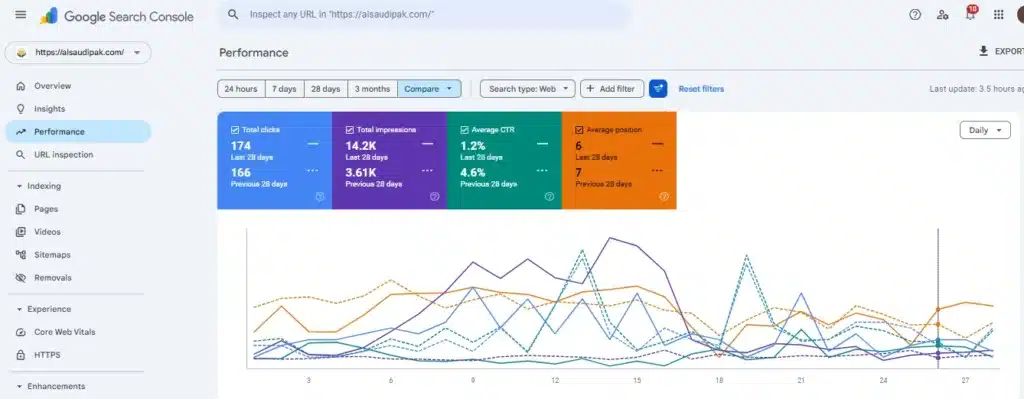
This experience confirmed an important lesson: sustainable SEO growth comes from publishing valuable content, organizing it into related topic clusters, optimizing every page carefully, and continuously improving the user experience. Rather than relying on shortcuts, building topical authority and maintaining content quality creates results that continue to grow over time.
Pro Tips Every SEO Beginner Should Remember
- Write for humans before search engines
- Solve real problems
- Update old articles regularly
- Focus on topical authority
- Improve website speed
- Build natural backlinks
- Track performance instead of guessing
- Keep learning because SEO evolves continuously
By mastering keyword research and on-page optimization, you’ve already covered the most important skills required to build sustainable organic traffic.
Technical SEO Fundamentals
Technical SEO focuses on optimizing the backend elements of a website that help search engines access, understand, and index content more efficiently. While users may not directly see these optimizations, they play a crucial role in determining how well a website performs in search results.
For example, a fast-loading website improves user experience and reduces bounce rates, while a mobile-friendly design ensures visitors can easily browse content on smartphones and tablets. Similarly, an XML sitemap helps search engines discover important pages, and proper indexing ensures those pages can appear in search results.
Technical SEO also involves improving crawlability, fixing broken links, implementing structured data, and maintaining website security through HTTPS. These elements help search engines understand your content more accurately and deliver it to the right audience.
A technically optimized website creates a strong foundation for all other SEO efforts. Without it, even high-quality content and strong keyword targeting may struggle to achieve their full ranking potential.
AI SEO and ChatGPT Search Optimization
Search is evolving rapidly. Today, users don’t rely only on traditional search engines. Many people now use AI-powered platforms such as ChatGPT, Gemini, Perplexity, and AI Overviews to find answers.
This shift has introduced a new concept known as AI SEO or Generative Engine Optimization (GEO). Instead of optimizing content solely for search engines, website owners must also create content that AI systems can easily understand, summarize, and reference.
To improve visibility in AI-powered search experiences:
- Answer questions clearly and directly.
- Use descriptive headings and subheadings.
- Cover topics comprehensively.
- Include FAQs that address common user concerns.
- Use tables, lists, and structured formatting.
- Demonstrate expertise through practical examples and real-world experience.
AI systems prefer content that is organized, trustworthy, and easy to understand. As AI-powered search continues to grow, optimizing for both traditional search engines and AI platforms will become an essential SEO strategy for long-term success.
Website Speed Matters More Than Ever
Users expect websites to load almost instantly. If your page takes several seconds to open, many visitors will leave before reading the first paragraph.
A faster website improves:
- User experience
- Search rankings
- Conversion rates
- Mobile performance
Speed Optimization Checklist
- Compress images
- Use WebP format
- Enable browser caching
- Minify CSS and JavaScript
- Remove unnecessary plugins
- Choose quality hosting
- Optimize fonts
- Lazy load images
Small improvements in loading speed can create a much better browsing experience.
Understanding Core Web Vitals
Core Web Vitals are user experience metrics that help search engines evaluate how visitors interact with a website.
The three primary Core Web Vitals are:
Largest Contentful Paint (LCP)
Measures how quickly the main content of a page loads. Faster loading pages create a better user experience.
Interaction to Next Paint (INP)
Measures how responsive a page feels when users interact with buttons, forms, or navigation elements.
Cumulative Layout Shift (CLS)
Measures visual stability. Pages with shifting elements create a frustrating experience for users.
Improving Core Web Vitals can lead to better engagement, lower bounce rates, and stronger search performance. Optimizing images, improving hosting quality, reducing unnecessary scripts, and implementing efficient website design are effective ways to improve these metrics.
Mobile SEO
Mobile SEO focuses on optimizing your website for users who access content through smartphones and tablets. With the majority of online searches now taking place on mobile devices, providing an excellent mobile experience is no longer optional—it’s essential for both user satisfaction and search engine rankings.
Think about your own browsing habits. If a website loads slowly, displays tiny text, or requires constant zooming and scrolling, you’re likely to leave within seconds. Search engines recognize this behavior and may rank poorly optimized websites lower in search results.
To deliver a seamless mobile experience, your website should include:
- Responsive design that adapts to all screen sizes
- Readable font sizes without requiring zooming
- Proper spacing between content elements
- Easy-to-click buttons and navigation menus
- Fast loading pages
- Optimized images that maintain quality without slowing down the site
Mobile optimization not only improves usability but also helps reduce bounce rates, increase engagement, and encourage visitors to spend more time on your website. Since search engines primarily use the mobile version of a website for indexing and ranking, ensuring a mobile-friendly experience should be a core part of every successful SEO strategy.
Crawlability and Indexing
Before your content can appear in Google search results, search engines must first discover and store your pages in their database. This process involves two important steps: crawling and indexing. Crawling occurs when search engine bots visit your website and scan its content, while indexing happens when those pages are added to Google’s search index and become eligible to rank.
Many website owners publish high-quality content but later discover that their pages are not appearing in search results. In most cases, the issue is not the content itself but a problem with crawlability or indexing.
How to Check if a Page Is Indexed
A simple way to check whether Google has indexed your page is by searching:
site:yourdomain.com/page-url
If your page appears in the results, it is indexed. If it does not appear, Google may not have indexed it yet. You can also use Google Search Console to inspect a specific URL and see its indexing status. If the page is not indexed, Google often provides a reason, such as crawl errors, redirects, duplicate content, or blocked resources.
What to Do If Your Page Is Not Indexed
If a page is not being indexed, try the following steps:
- Submit the URL through Google Search Console.
- Ensure the page is included in your XML sitemap.
- Add internal links pointing to the page from other relevant articles.
- Check that the page is not blocked by robots.txt or noindex tags.
- Improve content quality and ensure it provides unique value.
- Fix crawl errors and broken links that may prevent access.
Best Practices for Better Crawlability and Indexing
- Create and maintain an XML sitemap.
- Use a clear website structure and logical navigation.
- Keep URLs short and descriptive.
- Avoid duplicate content across multiple pages.
- Build strong internal links between related articles.
- Regularly monitor indexing reports in Google Search Console.
When search engines can easily crawl and index your website, your content has a much better chance of appearing in search results and attracting organic traffic. A well-organized website not only helps Google understand your content but also creates a smoother experience for your visitors.
HTTPS and Website Security
Security is another important ranking signal. Visitors trust websites that use HTTPS encryption because it protects their data. Always install an SSL certificate and redirect all HTTP pages to HTTPS. Besides SEO benefits, it also increases user confidence.
Off-Page SEO and Link Building
While on-page SEO focuses on optimizing the content and structure of your website, off-page SEO is all about building your website’s authority, credibility, and trust across the internet. Search engines want to rank websites that are not only well-optimized but also recognized and recommended by other reputable sources.
One of the most important elements of off-page SEO is link building. A backlink is created when another website links to one of your pages. These links act as signals of trust, telling search engines that your content is valuable enough for others to reference and recommend.
However, not all backlinks are created equal. A single backlink from a trusted and authoritative website can often provide more value than dozens of low-quality links. Search engines evaluate the quality, relevance, and authority of the linking website when determining the impact of a backlink.
Why Backlinks Matter
Backlinks help search engines:
- Discover new pages on your website
- Measure your website’s authority
- Understand the credibility of your content
- Improve rankings for competitive keywords
- Increase referral traffic from other websites
Effective Ways to Earn Quality Backlinks
- Publish original, valuable, and shareable content
- Write guest posts on relevant websites
- Create data-driven guides and resources
- Build relationships with bloggers and industry experts
- Promote content through social media and online communities
- Earn mentions from reputable websites in your niche
The goal of link building is not to collect as many backlinks as possible. Instead, focus on earning high-quality links from relevant and trustworthy websites. Over time, these backlinks strengthen your website’s authority, improve search visibility, and help your content compete for higher rankings in search results.
Smart Link Building Strategies
Avoid buying thousands of low-quality backlinks. Instead, focus on earning links naturally.
Where to Get Free Backlinks for Your Website
Building quality backlinks doesn’t always require a large budget. Beginners can start by creating profiles, publishing content, participating in communities, and submitting their websites to reputable business directories. Below are some trusted platforms that can help improve online visibility and support a natural link-building strategy.
| Platform | Type | Best For |
|---|---|---|
| Profile | Personal & Business Branding | |
| Medium | Publishing | Content Distribution |
| About.me | Profile | Personal Branding |
| Crunchbase | Business Profile | Startup & Business Visibility |
| GitHub | Profile | Tech & Development Websites |
| Behance | Portfolio | Designers & Creative Professionals |
| Quora | Community | Answer-Based Marketing |
| Community | Niche Discussions | |
| WordPress.com | Blogging | Free Content Publishing |
| Blogger | Blogging | Content Promotion |
| Tumblr | Micro Blogging | Brand Visibility |
| Social Platform | Visual Content Promotion |
Case Study: Recovering a Website Through Strategic Link Building
Challenge
A client website was experiencing a significant decline in organic visibility. Most target keywords had disappeared from Google’s search results, and several important keywords were showing as N/A (not ranking). Organic traffic had also dropped considerably, affecting overall website performance.
Strategy
After conducting an SEO review, I focused primarily on building a strong and natural backlink profile. For one month, I consistently executed a quality-focused link building campaign that included:
- High-quality Guest Posts
- Business Profile Creation
- Business Listings & Citations
- Niche-Relevant Forum Threads
- Authority Profile Links
- Diversified Anchor Text Strategy
Rather than chasing a large quantity of links, the focus remained on relevance, authority, and consistency.
Results
- Within approximately one month of consistent link-building efforts:
- Multiple target keywords returned to Google’s search results.
- Several keywords moved from Not Ranking (N/A) to Page 1 and Page 2 positions.
- Organic visibility improved significantly.
- Average keyword positions improved from 43.3 to 29.3.
- Click-through rate increased from 0.4% to 0.7%.
- Overall search performance showed positive growth across impressions and clicks.
Key Takeaway
This project reinforced one of the most important SEO lessons:
“Consistency in quality link building can produce remarkable results. A well-planned backlink strategy, executed consistently over time, can help recover rankings, improve visibility, and drive sustainable organic growth.”
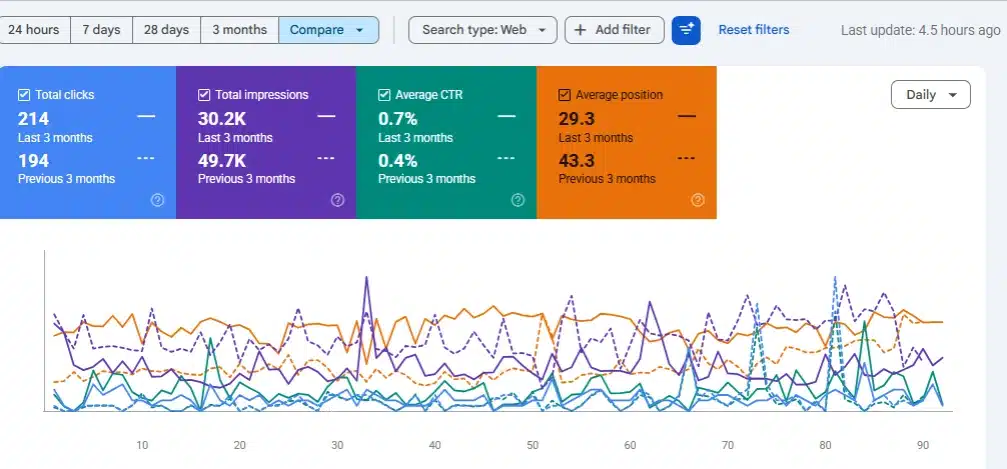
30-Day Link Building Campaign Results – Average Position Improved from 43.3 to 29.3 with Consistent Guest Posts, Citations, Profiles & Forum Links.
Publish Comprehensive and Valuable Guides
One of the most effective ways to earn high-quality backlinks is by creating comprehensive, in-depth content that provides real value to readers. When your content thoroughly covers a topic, answers common questions, and offers actionable insights, other websites are more likely to reference it as a reliable source.
Instead of publishing short articles that only scratch the surface, focus on creating detailed guides that help users solve a problem or achieve a specific goal. Well-researched resources often become valuable references for bloggers, content creators, and industry websites, leading to natural backlink opportunities over time.
The more useful and informative your content is, the greater the likelihood that others will share, mention, and link to it, helping strengthen your website’s authority and search engine visibility.
Guest Posting
Guest posting is one of the most effective off-page SEO strategies for building website authority, earning quality backlinks, and attracting targeted traffic. The process involves writing valuable content for another website within your niche and including a relevant link back to your own website.
However, successful guest posting is not about placing links everywhere. The goal should be to provide genuine value to the audience of the website where your article is published. When your content helps readers solve a problem or learn something new, they are more likely to click through to your website for additional information.
To get the best results from guest posting:
- Choose websites that are relevant to your niche.
- Publish high-quality, informative, and original content.
- Link to your website naturally, where it adds value to the reader.
- Avoid excessive or spammy link placement.
- Focus on websites with engaged audiences and strong authority.
For example, if you run a blog about freelancing, you could write a guest post on a digital marketing or online business website and naturally link to a detailed guide on your blog, such as “How to Start Freelancing in Pakistan.” Readers who want more information may visit your website, increasing both referral traffic and brand exposure.
Over time, consistent guest posting helps establish your expertise, strengthen your backlink profile, increase domain authority, and improve your chances of ranking higher in search engine results. When done correctly, guest posting benefits both the publishing website and your own, creating a win-win opportunity for long-term SEO growth.
Share Useful Resources
Instead of promoting aggressively, share genuinely helpful content within communities and social platforms. Authority grows through usefulness, not spam.
Build Topical Authority Instead of Chasing Individual Keywords
One of the biggest SEO mistakes beginners make is focusing on individual keywords rather than building expertise around a complete topic. While a single article may rank for a few search terms, it is rarely enough to establish long-term authority in a competitive niche.
Search engines increasingly favor websites that cover a subject comprehensively. When you consistently publish high-quality content around related topics, you demonstrate expertise and make it easier for search engines to understand what your website is about.
For example, if your website focuses on freelancing, publishing only one article about “How to Start Freelancing” is not enough. Instead, you should create supporting content that answers related questions your audience may have, such as:
- Best Freelancing Platforms for Beginners
- How to Get Your First Freelance Client
- Best Freelancing Skills to Learn
- How to Create a Winning Freelance Portfolio
- How to Receive Freelance Payments
- Common Freelancing Mistakes to Avoid
- Fiverr vs Upwork for Beginners
When these articles are connected through internal links, they create a strong content ecosystem that benefits both users and search engines. Readers can easily explore related topics, spend more time on your website, and find answers to multiple questions in one place.
Over time, this strategy helps build topical authority, strengthens your internal linking structure, and increases your chances of ranking for a wider range of keywords. Instead of chasing individual search terms, focus on becoming a trusted resource within your niche.
Common SEO Mistakes Beginners Make
Many websites struggle to achieve first-page rankings because they continue making the same SEO mistakes. Understanding and avoiding these common issues can significantly improve your chances of long-term organic growth.
1. Keyword Stuffing
One of the biggest mistakes beginners make is overusing the same keyword throughout their content. Many people believe that repeating a keyword multiple times will improve rankings, but modern search engines prioritize content quality and user experience.
Instead of forcing keywords into every sentence, focus on writing naturally and providing valuable information. Well-written content that reads naturally will always outperform keyword-stuffed pages.
2. Ignoring Search Intent
Even perfectly optimized content may fail to rank if it does not satisfy search intent. Before creating any article, ask yourself:
- What is the user looking for?
- Do they want information, a solution, or a product?
- What problem are they trying to solve?
When your content directly answers the user’s query, Google is more likely to reward it with higher rankings.
3. Publishing Thin Content
Short articles that provide little value often struggle to compete in search results. A 500-word article that barely covers a topic cannot compete with comprehensive, well-researched resources.
To improve your rankings, focus on creating content that:
- Covers the topic in depth
- Answers common questions
- Provides practical examples
- Offers real value to readers
Remember: depth and usefulness matter more than word count alone.
4. Forgetting Internal Links
Internal linking is an essential but often overlooked SEO strategy. Every article should guide visitors toward related pages and resources on your website.
Effective internal linking helps:
- Improve website navigation
- Increase user engagement
- Distribute authority across pages
- Help search engines discover content more efficiently
A strong internal linking structure can significantly improve your site’s overall SEO performance.
5. Never Updating Old Content
SEO is not a “publish and forget” strategy. Search engines favor content that remains accurate, relevant, and up to date.
Regularly review your existing articles and improve them by adding:
- New examples
- Updated screenshots
- Fresh statistics
- Additional FAQs
- Recent industry insights
- Relevant internal links
Consistently updating content signals to Google that your website is actively maintained and continues to provide value to users.
Key Takeaway
Avoiding these common SEO mistakes can dramatically improve your website’s performance. Focus on creating helpful content, understanding user intent, building strong internal links, and keeping your pages updated. Consistent optimization is often the difference between a website that struggles and one that ranks on the first page of Google.
Free SEO Tools Every Beginner Should Use
One of the biggest misconceptions about SEO is that you need expensive software to achieve results. While premium tools can be helpful, beginners can learn and implement effective SEO strategies using several powerful free tools available online.
Google Search Console
Google Search Console is one of the most valuable free SEO tools available. It provides direct insights into how your website performs in Google Search.
With Search Console, you can:
- Monitor impressions and clicks
- Track keyword performance
- Identify indexing issues
- Submit sitemaps
- Analyze page rankings
For beginners, it serves as the foundation of data-driven SEO.
Google Analytics
Understanding your visitors is just as important as attracting them. Google Analytics helps you analyze user behavior and measure the effectiveness of your content.
It allows you to:
- Track website traffic
- Monitor user engagement
- Identify top-performing pages
- Understand audience demographics
- Measure conversions and goals
These insights help you make smarter content and marketing decisions.
Google Trends
Google Trends helps you discover what people are searching for and how search interest changes over time.
You can use it to:
- Find trending topics
- Identify seasonal search patterns
- Compare keyword popularity
- Discover emerging opportunities
This tool is especially useful for content planning and staying ahead of industry trends.
Google Keyword Planner
Keyword research is a critical part of SEO, and Google Keyword Planner offers valuable data directly from Google.
It helps you:
- Generate keyword ideas
- Understand search demand
- Discover related keywords
- Analyze keyword opportunities
By targeting the right keywords, you can create content that aligns with what your audience is actively searching for.
Free AI Writing Tools
Creating high-quality content consistently can be challenging, especially when managing multiple projects. Free AI writing tools can help streamline the content creation process and improve productivity.
They can assist with:
- Blog outlines
- SEO-friendly titles
- Meta descriptions
- Keyword ideas
- Article structures
- Content briefs
However, it’s important to remember that AI should support your workflow rather than replace your expertise. The most successful content combines AI-powered efficiency with human creativity, experience, and strategic thinking.
30-Day SEO Roadmap for Beginners
Week 1
- Learn SEO fundamentals
- Set up Search Console
- Set up Analytics
- Research competitors
Week 2
- Publish two high-quality articles
- Optimize images
- Create internal links
- Improve URLs
Week 3
- Update older content
- Improve page speed
- Add FAQs
- Submit sitemap
Week 4
- Build quality backlinks
- Monitor rankings
- Analyze traffic
- Improve low-performing pages
- Repeat the process consistently.
Conclusion
Learning SEO is not about finding secret hacks or manipulating search engines. It is about creating exceptional content that solves real problems better than anyone else. Every optimized title, every internal link, every helpful explanation, and every improved user experience sends positive signals to both readers and search engines.
Whether you’re launching your first blog or growing an established website, mastering SEO Basics for Beginners creates a strong foundation for long-term organic success. Focus on quality over shortcuts, build topical authority instead of chasing individual keywords, and keep improving your content over time. The websites that consistently provide the best experience are the ones that continue ranking, attracting traffic, and growing year after year.
Frequently Asked Questions (FAQs)
What is the difference between SEO and SEM?
SEO focuses on organic traffic, while SEM includes paid advertising strategies.
Can I learn SEO without coding?
Yes. Most SEO fundamentals can be learned without programming knowledge.
How often should I update my content?
Review and update important content every few months to maintain relevance.
What is topical authority?
Topical authority is earned by publishing comprehensive content around a subject and covering related topics in depth.
What is an XML sitemap?
An XML sitemap helps search engines discover and crawl website pages more efficiently.
Why are backlinks important?
Backlinks act as trust signals that help search engines evaluate website authority.
What is keyword difficulty?
Keyword difficulty estimates how challenging it may be to rank for a specific search term.
Does website speed affect SEO?
Yes. Faster websites generally provide a better user experience and can improve search performance.
What is internal linking?
Internal linking connects related pages within the same website.
What is a meta description?
A meta description is a short summary that appears below a page title in search results.
What is local SEO?
Local SEO helps businesses appear in location-based searches and map results.
What is image SEO?
Image SEO focuses on optimizing visuals to improve accessibility, page speed, and search visibility.
What is technical SEO?
Technical SEO improves website infrastructure, crawlability, indexing, and performance.
Can AI replace SEO?
No. AI can assist with content creation and research, but strategic SEO still requires human expertise.
What is a featured snippet?
A featured snippet is a highlighted search result that directly answers a user’s query.
What is organic traffic?
Organic traffic consists of visitors who arrive through unpaid search results.
How many keywords should I target per article?
Focus on one primary keyword and several naturally related secondary keywords.
Is SEO still relevant in 2026?
Yes. SEO continues to evolve and remains one of the most effective long-term digital marketing strategies.
What is search intent?
Search intent is the reason behind a user’s search query.
How long should SEO content be?
Content length should depend on user intent and topic depth rather than a specific word count.
What is a canonical URL?
A canonical URL helps search engines identify the preferred version of a page.
What are long-tail keywords?
Long-tail keywords are longer, more specific search phrases that often have lower competition.
Why is mobile SEO important?
Most searches occur on mobile devices, making mobile optimization essential.
How do I measure SEO success?
Track rankings, impressions, clicks, organic traffic, and conversions.
What is the most important SEO factor?
There is no single factor. Content quality, user experience, technical optimization, and authority work together.